
一、安装PostgresSQL
1、安装rpm文件
yum install https://download.postgresql.org/pub/repos/yum/reporpms/EL-7-x86_64/pgdg-redhat-repo-latest.noarch.rpm
2、安装客户端
yum install postgresql10
3、安装服务端
yum install postgresql10-server
4、初始化
/usr/pgsql-10/bin/postgresql-10-setup initdb
5、设置自动启动并且启动postgresql服务
systemctl enable postgresql-10
systemctl start postgresql-10
二、创建用户和数据库
1、使用postgres用户登录(PostgresSQL安装后会自动创建postgres用户,无密码)
su - postgres
2、登录postgresql数据库
/usr/pgsql-10/bin/psql
3、创建用户和数据库并授权
create user test_user with password '******';            // 创建用户
create database test_db owner test_user;                 // 创建数据库
grant all privileges on database test_db to test_user;   // 授权
三、修改数据库配置
1、修改/var/lib/pgsql/10/data/postgresql.conf文件,取消 listen_addresses 的注释,将参数值改为“*”
vi /var/lib/pgsql/10/data/postgresql.conf

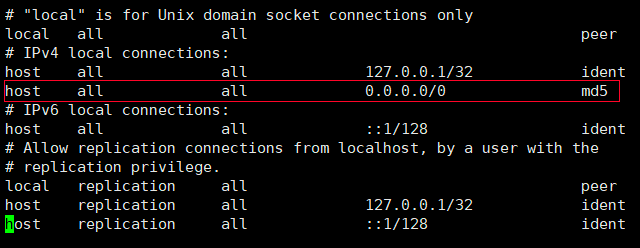
2、修改/var/lib/pgsql/10/data/pg_hba.conf文件
vi /var/lib/pgsql/10/data/pg_hba.conf
3、切换到root用户,重启postgresql服务
systemctl restart postgresql-10.service
四、数据库基本命令
systemctl start postgresql-10.service     // 启动服务
systemctl stop postgresql-10.service      // 关闭服务
systemctl restart postgresql-10.service   // 重启服务
systemctl status postgresql-10.service    // 查看状态